
In the fast-paced world of technology, maintaining productivity is crucial. For professionals who rely on Lenovo laptops, having a reliable docking station can significantly enhance efficiency. These accessories not only provide a seamless transition from a mobile to a desktop environment but also eliminate the hassle of connecting multiple peripherals. Understanding which docking stations are compatible and beneficial for Lenovo laptops can vastly improve one’s work setup.
The Benefits of Using a Laptop Docking Station
A laptop docking station is a powerful tool that extends the capabilities of your laptop. Here are some key benefits:
- Expanded Connectivity: Docking stations offer multiple USB ports, HDMI, Ethernet, and audio jacks, allowing for the connection of various peripherals.
- Improved Ergonomics: By connecting external monitors and keyboards, users can create a more ergonomic workspace, reducing strain and increasing comfort.
- Enhanced Productivity: With the ability to connect multiple monitors, users can multitask more efficiently, displaying different applications simultaneously.
- Quick Transition: Moving from a mobile to a stationary environment becomes seamless, with all peripherals connected via a single docking station.
Top Lenovo Docking Stations to Consider
Choosing the right laptop docking station lenovo can be overwhelming given the variety of options available. Here are some top choices:
Lenovo ThinkPad Ultra Docking Station
- Compatibility: Suitable for a wide range of ThinkPad models.
- Ports: Includes USB 3.0, HDMI, DisplayPort, VGA, and Ethernet ports for diverse connectivity.
- Security: Equipped with a key lock for added security.
Lenovo USB-C Mini Dock
- Portability: Compact and lightweight, ideal for users on the go.
- Connectivity: Offers USB-C, HDMI, and Ethernet connections.
- Ease of Use: Simple plug-and-play setup.
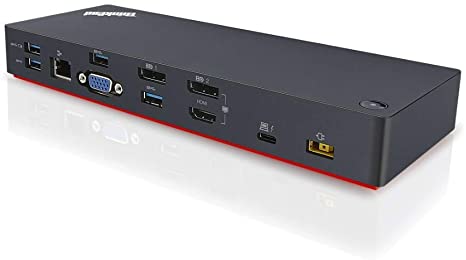
Lenovo ThinkPad Thunderbolt 3 Dock
- High-Speed Data Transfer: Leverages Thunderbolt 3 technology for rapid data transfer.
- Multiple Displays: Supports up to three 4K displays for enhanced multitasking.
- Power Delivery: Provides power to the laptop while connected.
How to Choose the Right Docking Station
Selecting the right docking station involves considering several factors:
- Compatibility: Ensure the docking station is compatible with your Lenovo laptop model.
- Ports Required: Identify the number and type of ports needed for your peripherals.
- Workspace Requirements: Consider the size and design of the docking station in relation to your workspace.
- Budget: Evaluate the cost of the docking station against its features and benefits.
Conclusion
Incorporating a docking station into a work setup not only streamlines connectivity but also enhances productivity. With a variety of options available, Lenovo users can find solutions that cater to specific needs and preferences. Whether it’s for a dedicated office setup or a flexible mobile solution, the right laptop docking station lenovo can make a significant difference in day-to-day operations.